Text to video
Describe the idea
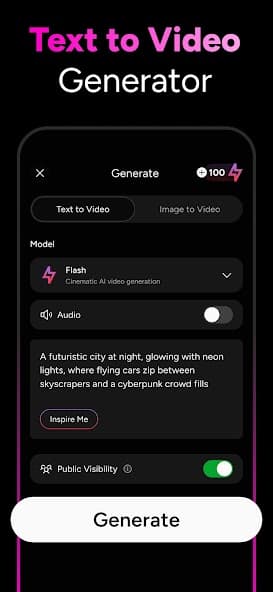
Write a prompt and turn a story, product angle, brand concept, or social post into a video draft.
 OpenVideoAI Video GeneratorContact
Text and image to AI video
Create video drafts from text prompts or image references, explore cinematic styles, and review AI-generated results before sharing them with your audience.
50K+
Google Play downloads
4.4
Google Play rating
4.2
App Store rating
OpenVideo
AI scene builder
Prompt route
A neon product reveal with cinematic motion, warm reflections, and social-ready pacing
Creation process
OpenVideo is built for fast visual exploration. Start with language, shape a direction, generate a draft, then inspect the result before posting or presenting.
Start with a compact description or a visual reference.
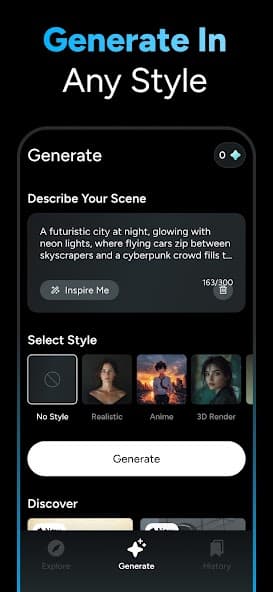
Choose a style, model, tone, or output direction.
Generate a video draft and review quality, rights, and suitability.
Use approved outputs in the channels and formats that fit the project.
Creative modes
Use OpenVideo for social reels, explainers, concept boards, product tests, education visuals, and story experiments. Every output still needs human review before use.
Text to video
Write a prompt and turn a story, product angle, brand concept, or social post into a video draft.
Image motion
Use a visual reference as the starting point, then review the generated motion before publishing.
Cinematic styles
Try cinematic, animated, social, product, or concept styles so each prompt has a direction.
Fast exports
Create short AI videos for campaigns, pitch boards, experiments, and social channels.
Review note
AI-generated videos can be surprising, imperfect, or unsuitable without review.
Check prompts, uploaded references, likeness rights, music, claims, policy fit, and visual details before sharing outputs externally.
Support desk
This site keeps the main support paths visible for marketplace purchases, account controls, privacy questions, and AI output concerns.
Support email
For account, billing, purchase, generation, or bug questions, contact admin@88tech.co.
Email supportRefund policy
Apple App Store and Google Play refunds are handled by the marketplace where the purchase was made.
Read refundsAccount deletion
Where accounts are available, deletion starts in the app's account, profile, or settings area.
Read privacyReady to create